Mietubl
Mietubl Cutting Machine Knowledge Base
Home /FAQ
Knowledge Base / MTB-CUT 180T /

What to do when sensor not working

Last updated Nov 22, 2025
M
Mietubl Team
sensor not working sensor check settings material auto feeding enable sensor troubleshooting settings sensor issue auto feeding sensor disabled
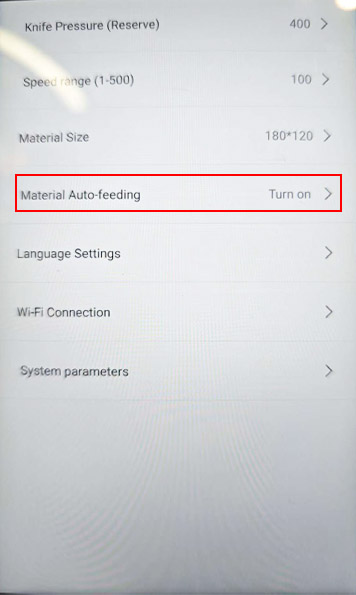
If the sensor is not working, please check whether it has been disabled in the settings.
Go to Settings, find the option “Material Auto-feeding”, and make sure it is turned ON.


Was this article helpful?

Your feedback helps us improve the knowledge base.

Previous
My machine is not loading anything, even with the internet working
Next
How can I connect screen protector machine with laptop
Related Articles
  • My machine is not loading anything, even with the internet working
    MTB-CUT 180T
  • How can I connect screen protector machine with laptop
    MTB-CUT 180T
  • Why does the film bend during cutting
    MTB-CUT 180T
  • How do I change my password
    MTB-CUT 180T
  • Why it cuts half and then leaves
    MTB-CUT 180T

Still need help?

Contact Support
© 2025 Mietubl Co.
Privacy Terms